

Wuthering Waves Rigging & Bone Collections
1. 3D Facial Expression Control Panel
Section titled “1. 3D Facial Expression Control Panel”Upon importing and rigging a Wuthering Waves character, the add-on builds a dedicated Face Rig Panel equipped with intuitive direct-manipulation widgets and expression preset sliders:
- Eyes & Brows: Direct widgets positioned around the face for pupil tracking, squinting, blinking, and eyebrow angling.
- Mouth Shapes: Individual lip corner, open mouth, smile, frown, and phoneme controllers.
- Cutscene Presets: Organized sliders on the facial board for quickly triggering and blending the character’s built-in expression poses.
2. Hair & Clothes Physics (Damped Track)
Section titled “2. Hair & Clothes Physics (Damped Track)”The add-on automatically generates a dynamic physics rig using Blender’s native Damped Track constraints:
- Enable Hair & Clothes Physics in the Setup Settings before running the setup (or apply it afterwards via Old Setup > Rig Character).
- Adjust the Hair and Clothes influence sliders in the N-panel to customize the responsiveness and damping strength of the dynamic secondary motion.
3. Bone Collections
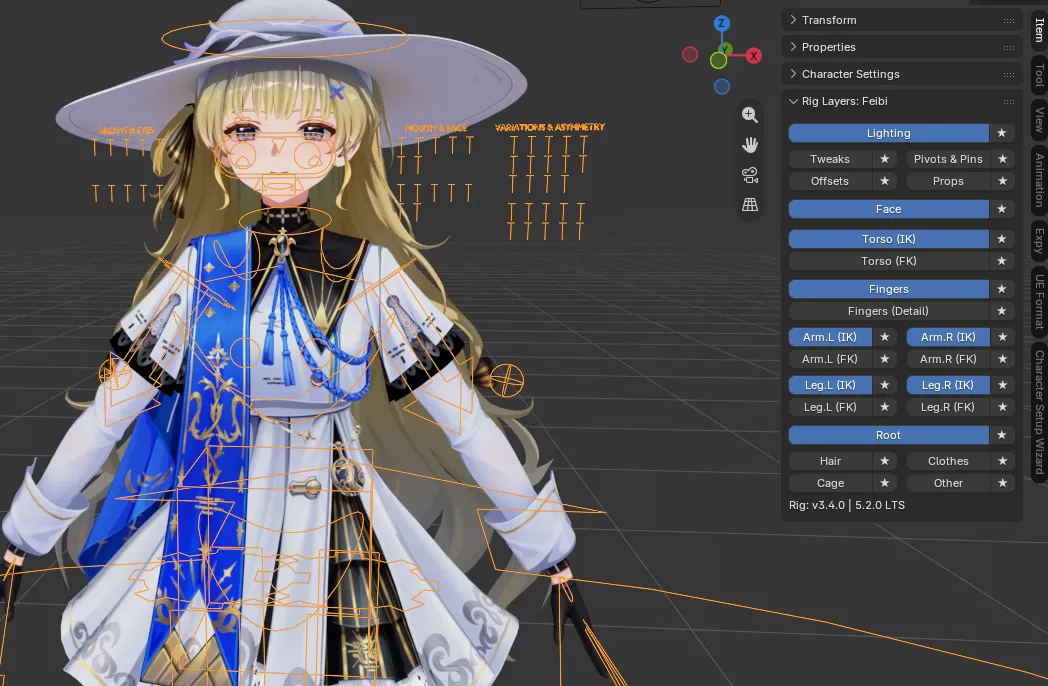
Section titled “3. Bone Collections”Character armatures are organized into structured groups within the Bone Collections tab (Blender 5.2+), making it easy to isolate and animate specific body parts.
Bone Collections Overview
Section titled “Bone Collections Overview”- Face: Eyebrow, eye, eyelid, pupil, nose, and mouth controllers.
- Torso (IK / FK): Spine, chest, neck, and head handles.
- Arm.L / Arm.R (IK & FK): Left and right arm chains with individual IK target pins and pole targets.
- Leg.L / Leg.R (IK & FK): Left and right leg chains with foot roll and knee target controls.
- Fingers: Hand and finger bone controllers.
- Hair: Dynamic secondary bones for hair strands and pony tails.
- Clothes: Dynamic secondary bones for coats, skirts, capes, and tassels.
- Lighting: Vector handles and lighting controllers.