

General Info
Wizard Panel Legend
Section titled “Wizard Panel Legend”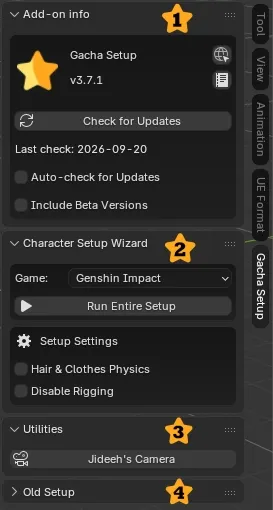
- Add-on info: Shows the installed Gacha Setup version, Check for Updates button with last check date, plus Auto-check for Updates and Include Beta Versions options.
- Character Setup Wizard: Select your game (Genshin Impact, Honkai: Star Rail, Zenless Zone Zero, Neverness to Everness, Wuthering Waves, Arknights: Endfield), click Run Entire Setup to execute the complete automated import, shaders, outlines, rigging, and compositing pipeline in one click, and adjust Setup Settings beforehand (Hair & Clothes Physics for dynamic Damped Track physics, Disable Rigging to skip rig and facial rig generation).
- Utilities: Extra helper operators, such as Jideeh’s Camera.
- Old Setup: Legacy step-by-step sections (Basic / Advanced Setup) to run each setup stage individually from top to bottom (only for advanced users).
Character Settings (Item Panel)
Section titled “Character Settings (Item Panel)”Once your character is set up, select the character armature or mesh and press N in the 3D Viewport. Open the Item tab to access the Character Settings panel, with real-time controls that vary slightly per game (no need to edit shader node trees manually):
- Lighting Mode: Switch between built-in lighting presets —
Default,Sunrise,Day,Sunset,Night,Rainy— or chooseCustomto fine-tune each color channel of the shader. - Hair & Clothes Physics: Apply or adjust the dynamic Damped Track physics on hair and clothing.
- Rig Layers: Organized bone collections (Face, Torso, Arms, Legs, Fingers, Hair, Clothes, Lighting, and more) to isolate body parts while animating.
- Light direction object: A dedicated object is created in the scene collection to rotate the light vector (adjust its Rotation XYZ values in the Item Transform panel).
For the exact options of each game, see its Lights & Coloramp guide:
- Genshin Impact
- Honkai: Star Rail
- Zenless Zone Zero
- Neverness to Everness
- Wuthering Waves
- Arknights: Endfield
Community & Feedback
Section titled “Community & Feedback”Omatsuri Discord
Section titled “Omatsuri Discord”Join the Omatsuri Discord community! It is an active hub where you can find people to help you and where creators share the latest news, resources, and workflows for 3D anime games (Genshin Impact, Honkai: Star Rail, Zenless Zone Zero, Wuthering Waves, and more).
Additionally, there is a dedicated post in the sharing section for Gacha Setup where you can report bugs, suggest new features, ask questions, and share your feedback!
Join the Omatsuri Discord Server
Changelog (Where to See Changes)
Section titled “Changelog (Where to See Changes)”Version history and release notes are published on GitHub. To see what changed in each version:
The latest available version is always at Latest Release.