

Arknights: Endfield Rigging & Bone Collections
1. 3D Facial Expression Control Panel
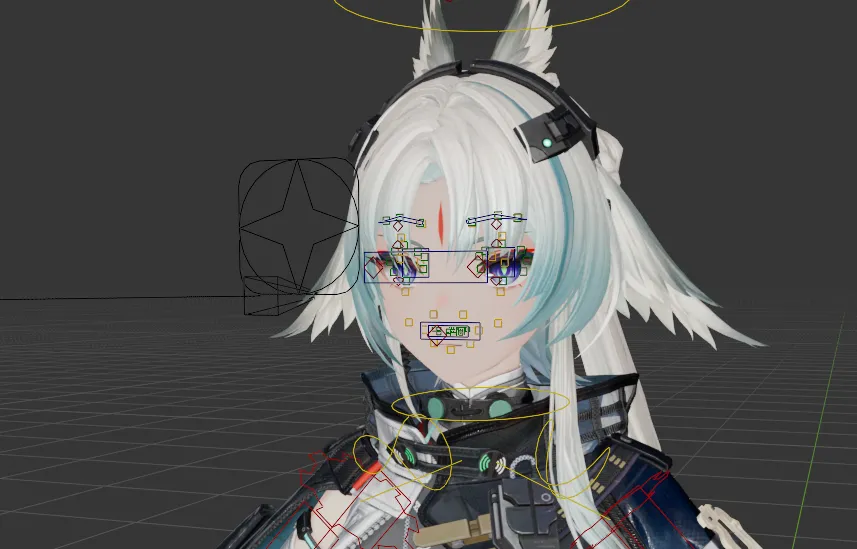
Section titled “1. 3D Facial Expression Control Panel”Upon importing and rigging an Arknights: Endfield character, the add-on builds the adapted Isaac Face Rig with direct on-face manipulation widgets:
- Eyebrow & Eyelid Controls: Direct widgets positioned over the face for precise posing of eyebrows and blinking.
- Pupil & Eye Tracking: Dedicated gaze widgets and dynamic drivers.
- Mouth & Lip Phonemes: Controllers for mouth opening, smiles, frowns, and speech phonemes.
2. Hair & Clothes Physics (Damped Track)
Section titled “2. Hair & Clothes Physics (Damped Track)”The add-on automatically generates a dynamic physics rig using Blender’s native Damped Track constraints:
- Enable Hair & Clothes Physics in the Setup Settings before running the setup (or apply it afterwards via the Character Settings panel > Apply Physics).
- Adjust the Hair and Clothes influence sliders in the N-panel to customize the responsiveness and damping strength of the dynamic secondary motion.
3. Bone Collections & Rig Layers
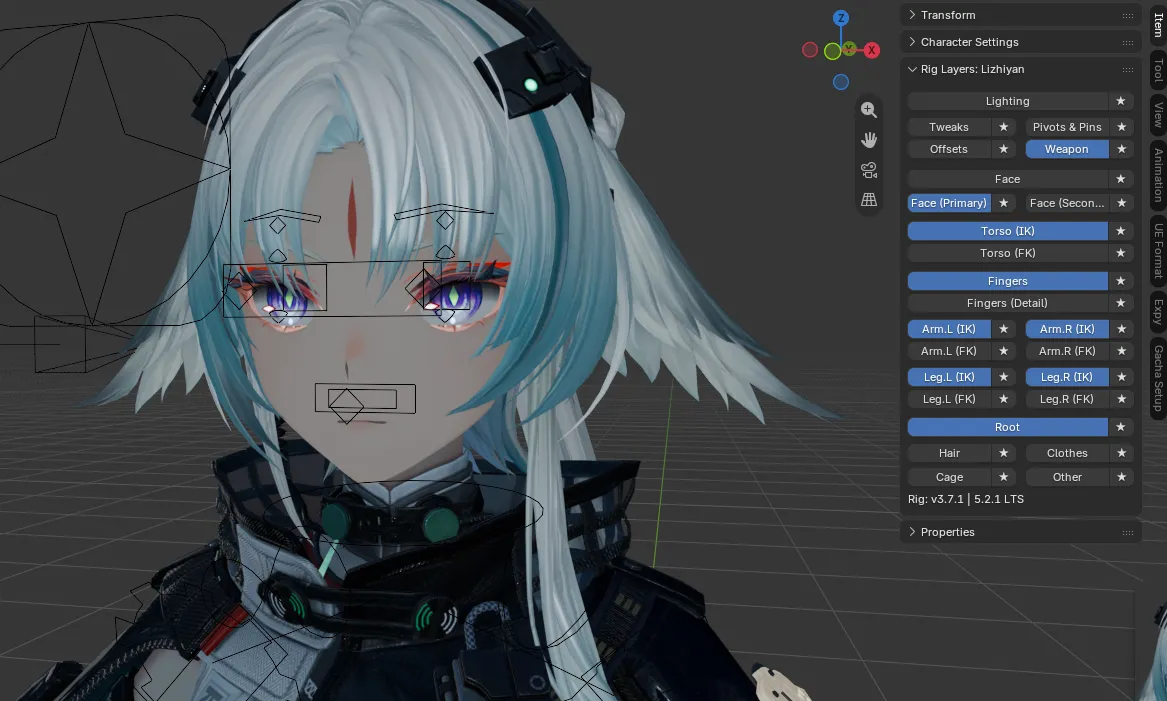
Section titled “3. Bone Collections & Rig Layers”Character armatures are organized into structured groups within the Bone Collections / Rig Layers tab (Blender 5.2+), making it easy to isolate and animate specific body parts.
Rig Layers Overview
Section titled “Rig Layers Overview”- Face (Primary / Secondary): Eyebrow, eye, eyelid, pupil, nose, and mouth controllers.
- Torso (IK / FK): Spine, chest, neck, and head handles.
- Arm.L / Arm.R (IK & FK): Left and right arm chains with individual IK target pins.
- Leg.L / Leg.R (IK & FK): Left and right leg chains with foot roll and knee target controls.
- Fingers (Detail): Hand and finger bone controllers.
- Hair / Clothes / Cage / Other: Dynamic secondary bones for hair strands, coats, and accessories.
- Lighting / Tweaks / Pivots & Pins / Offsets / Weapon: Utility and weapon control layers.