

Rigging
Rigging Suite Overview
Section titled “Rigging Suite Overview”The Gacha Setup rigging module unifies bone hierarchy fixes, facial driver creation, bone collections, and Rigify generation across anime models. It provides specialized animation controls, limb IK/FK pinning, parent switching, facial driver panels, and bone visibility layers.
3D Facial Rig Panels (Face Panels)
Section titled “3D Facial Rig Panels (Face Panels)”Depending on the character model and setup, the add-on configures specialized 3D facial driver control boards positioned near the character’s head. These boards allow manipulating shape keys, blink triggers, mouth phonemes, and eye tracking directly in the 3D Viewport without manual slider adjustments. The main types of face rigs included are:
Custom 3D Driver Board
Section titled “Custom 3D Driver Board”A driver board positioned behind the character’s head to coordinate facial expressions, gaze, and mouth visemes:
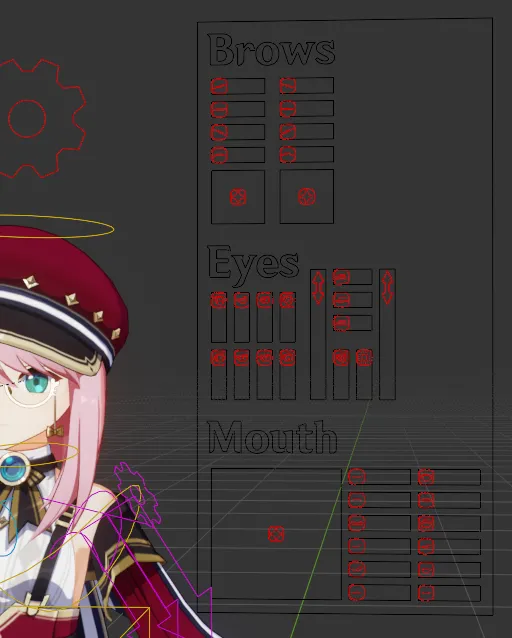
- Brows: Dedicated sliders and bone widgets to trigger anger, sadness, surprise, and brow tilt shape keys.
- Eyes: Eyeball tracking gizmos, eye squinting, blink triggers, and shape key blend sliders with dynamic bounds to prevent eye mesh popping.
- Mouth: Expression bone sliders for open mouth, smile, frown, O-shape, and custom mouth phonemes.
Isaac Face Rig System
Section titled “Isaac Face Rig System”A dual-mode facial control system featuring both on-face widgets and external preset boards:
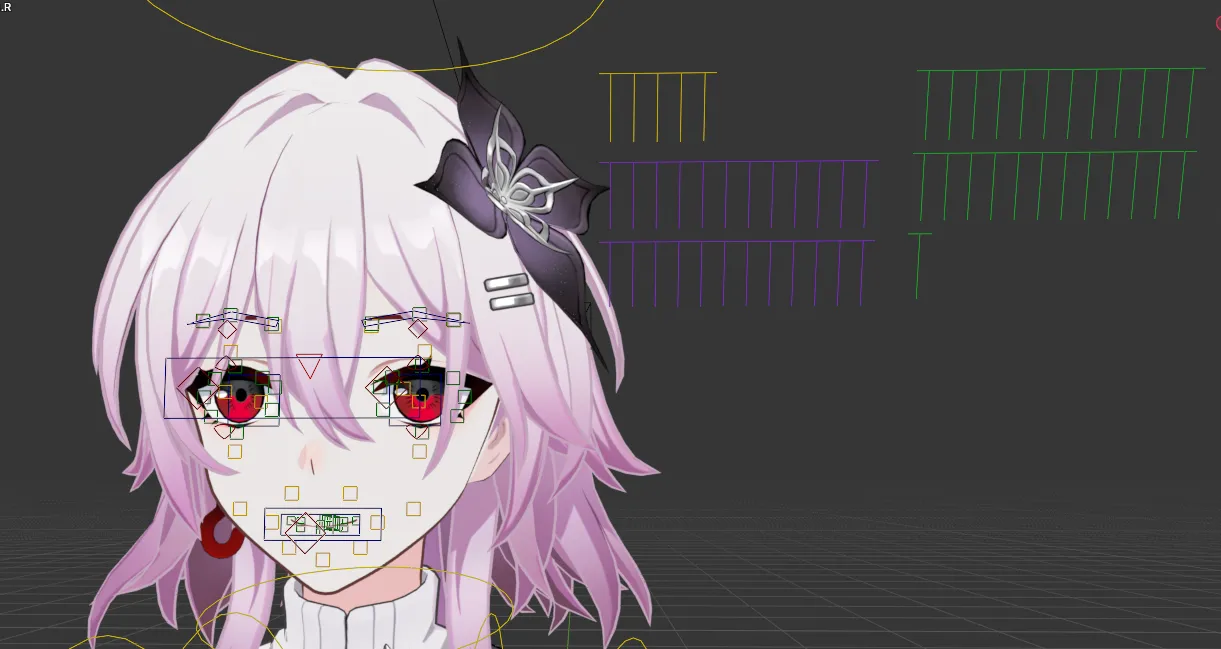
- On-Face Manual Controls: Direct bone widgets positioned over the eyes, brows, and mouth for detailed micro-expressions.
- Side Preset Shape Key Sliders: Sliders located adjacent to the head board to trigger and blend pre-configured character expression presets.
Jideeh Face Rig
Section titled “Jideeh Face Rig”An integrated facial rig structure designed for expressive anime mouth and eye articulation:
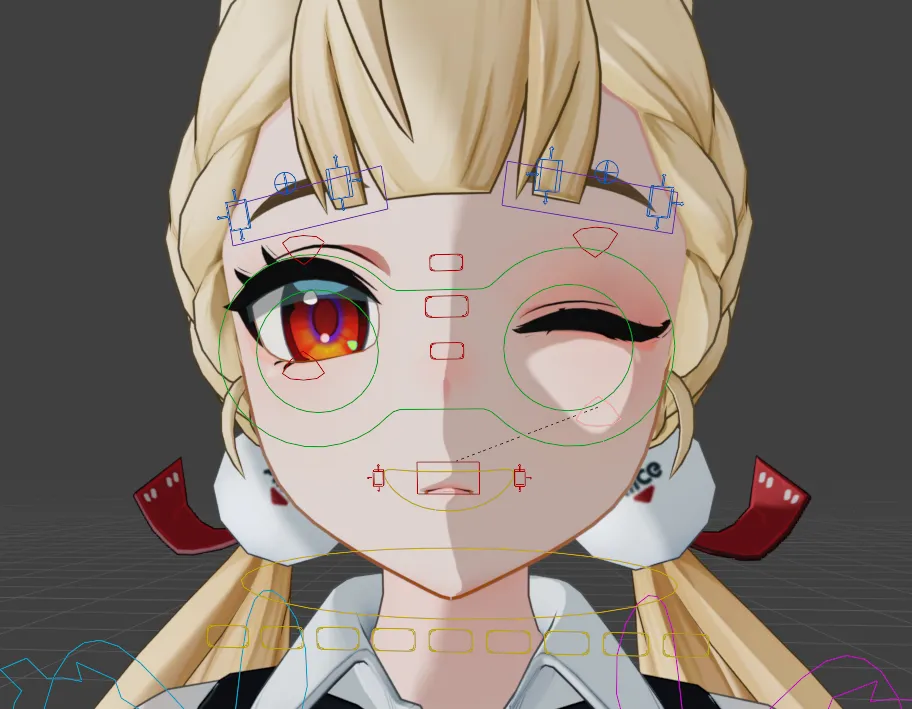
- jideeh Facial Rig Integration: Advanced drivers for eyebrows, eyelids, eye tracking, and nuanced mouth shape keys.
- On-Face Control Widgets: Allows intuitive posing of individual facial features directly in the 3D viewport.
Rig Layers (Bone Collections)
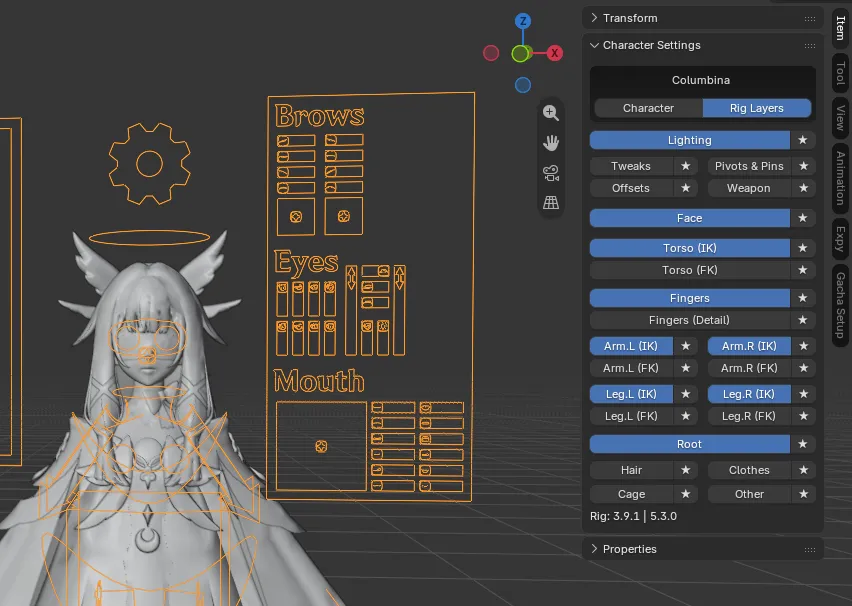
Section titled “Rig Layers (Bone Collections)”In Blender 5.2+ and 4.x, armatures utilize organized bone collections. The Rig Layers tab inside Character Settings (in the Item tab of the 3D Viewport sidebar) lets you toggle body parts on and off while animating, or solo individual layers using the solo star buttons ():
Standard Rig Layer Categories
Section titled “Standard Rig Layer Categories”- Lighting & Face:
Lighting: 3D lighting panel andLight Directionbone controls.Face: Expression bones, mouth shapes, eyebrows, and eye tracking.
- Torso & Spine:
Torso (IK): Torso inverse kinematics controls.Torso (FK): Forward kinematics spine rotation bones.
- Fingers & Hands:
Fingers,Fingers (Detail): Finger curling, spreading, and individual joint tweaks.
- Limbs (Arms & Legs):
Arm.L (IK)/Arm.R (IK)andArm.L (FK)/Arm.R (FK): Dual setup for arms.Leg.L (IK)/Leg.R (IK)andLeg.L (FK)/Leg.R (FK): Dual setup for legs and feet.
- Tweaks, Pivots & Secondary:
Tweaks: Bendy and deformation fine-tuning controls.Pivots & Pins: Hand and foot rotation pivots, elbow/knee pinning.Offsets: Position offsets for root and attachment accessories.Weapon: Props and equipped character weapons.Root: Master character placement bone.Hair,Clothes,Cage,Other: Secondary physics chains, deformation cages, and miscellaneous bones.
Head Controller & Head Tracker
Section titled “Head Controller & Head Tracker”The rig includes a dedicated Head Controller tracking setup. When selected, you can control head follow dynamics and view constraints:
- Use Head Tracker Controller: Switches head aiming between manual FK rotation and the automated look-at target bone.
Limb Cog Gizmos & IK / FK Controls
Section titled “Limb Cog Gizmos & IK / FK Controls”Gacha rigs feature intuitive gear/cog bone gizmos on limbs and pivots to configure IK/FK snapping, stretching, and space switching on the fly.
Master Settings (Top Cog / Plate Settings)
Section titled “Master Settings (Top Cog / Plate Settings)”The master setting controller provides global sliders for the character:
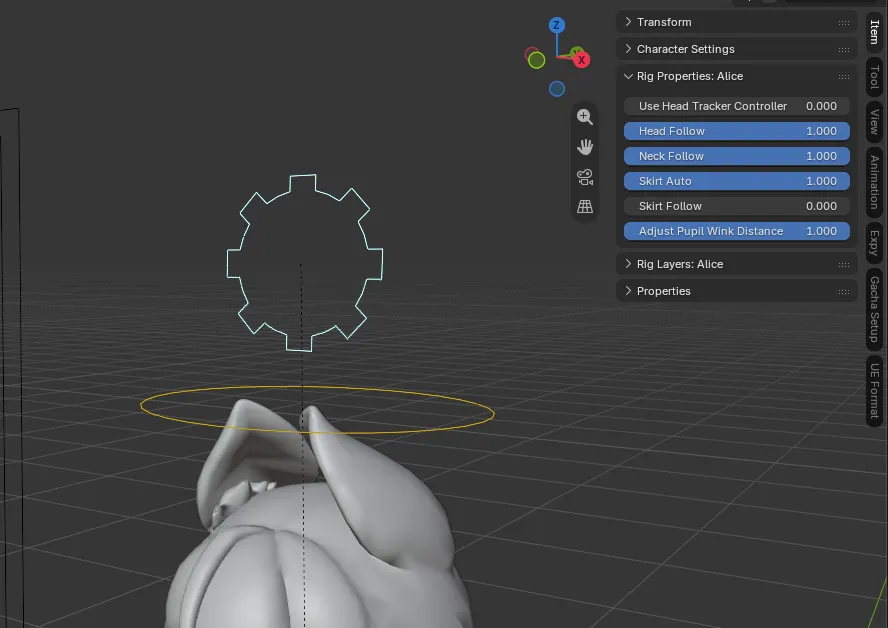
- Use Head Tracker Controller: Controls how much the head follows the head tracker instead of manual head rotation.
- Head Follow: Adjusts how much the head follows the torso’s rotation.
- Neck Follow: Adjusts how much the neck follows the torso’s rotation.
- Skirt Auto: Controls the influence of the skirt’s automatic movement with the legs.
- Skirt Follow: Adjusts how much the skirt follows the torso.
- Adjust Pupil Wink Distance: Adjusts pupil correction during winks and blinks to reduce clipping.
Arm Settings & Elbow Pin
Section titled “Arm Settings & Elbow Pin”Selecting the arm gear controller displays properties for arm kinematics:
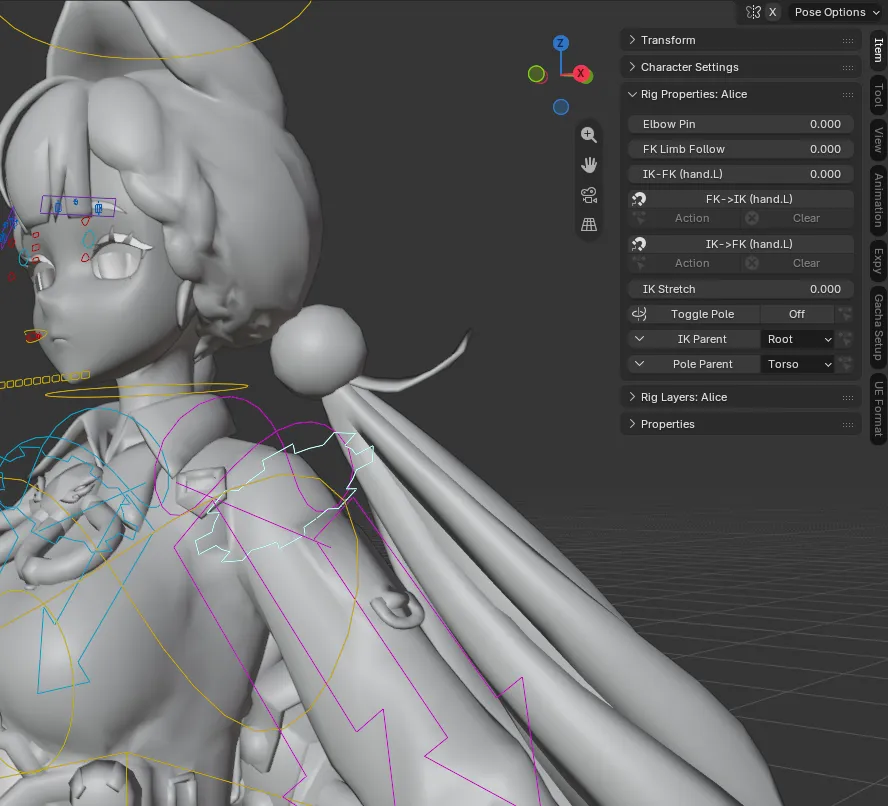
- IK / FK Switch: Seamlessly toggle between Inverse Kinematics (IK hand goals) and Forward Kinematics (FK shoulder-to-hand angles).
- Elbow Pin (Tweak Pin): Pin elbow placement in space regardless of forearm rotations.
- Parent Switch: Switch IK targets to follow
root,torso, orchestwith optional baking.
Leg Settings & Knee Pin
Section titled “Leg Settings & Knee Pin”Selecting the foot or leg gear controller provides leg configuration:
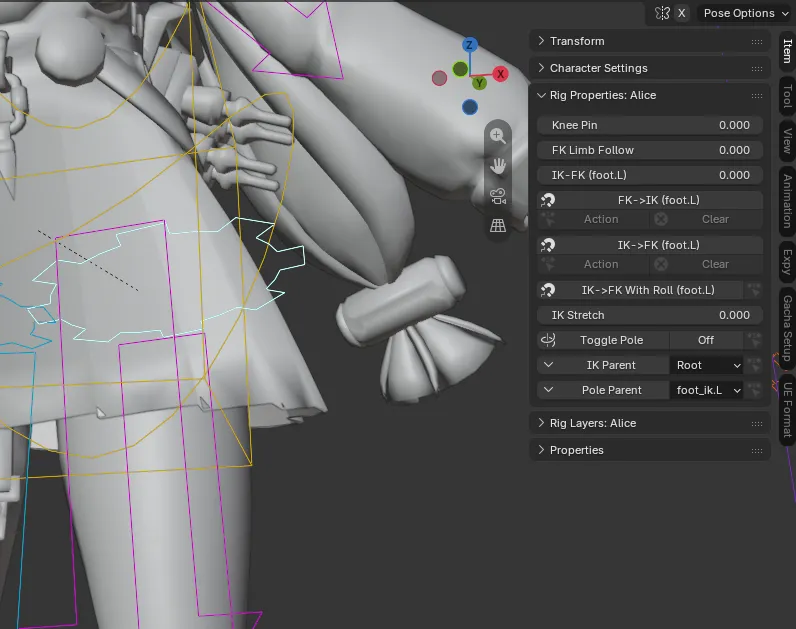
- IK / FK Switch: Toggle leg animation mode between foot IK planting and FK hip swinging.
- Knee Pin: Locks or relaxes knee bending direction.
- Foot Roll & Hinge: Controls heel-to-toe rolling and toe flex during walks and runs.